

Version 7.4 and higher
When a message is generated, it will receive a date + time from which the message can be sent. From this date and time onward, the message will be available for the sending mechanism of the regarding message type, for example the service which sends out text messages.
The actual sending moment depends on the configuration of the sending mechanism. For example, if the mechanism is configured to send messages each 15 minutes, the message will be sent 15 minutes or less after the ‘from’ moment. The way the ‘from’ moment is calculated is described below.
From when on can messages be sent?
Sending moment of confirmation messages – per message type
Setting 21 defines for each message type the sending moment. The options are:
- Daily at a specific time of day
- On workdays at a specific time of day
- With a certain delay, right after generating the message
- Never generate messages
Also, it is possible to define the earliest moment at which the message may be sent (this moment is defined as a maximum number of days before the start of the appointment).
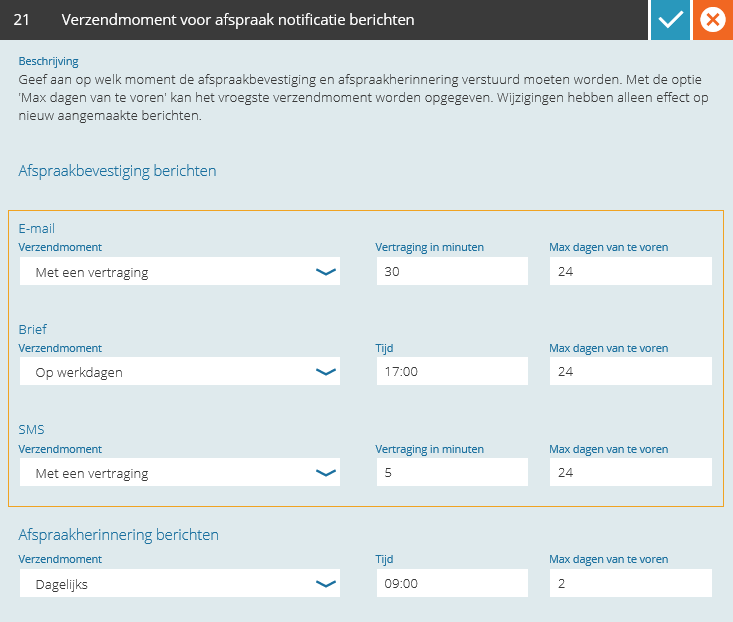
If ‘with a delay’ is selected, the number of minutes of the delay can be entered. A delay enables you to ‘intercept’ a message and edit it before it is sent. This can also be useful when the planning is manually adjusted a lot. A message will then only be sent for the final appointment (after its last change).
Examples
- A confirmation text message is generated on the 1st of February of 2017 at 8:30
- The appointment is planned on the 10th of February at 10:00
- The sending moment for text messages is set to ‘workdays at 9:00, maximally 10 days before the appointment’
Sending will be possible from: Wednesday, 1st of February of 2017, at 9:00.
- A confirmation text message is generated on the 1st of February of 2017 at 16:30
- The appointment is planned on the 10th of February at 10:00
- The sending moment for text messages is set to ‘workdays at 9:00, maximally 10 days before the appointment’
Sending will be possible from: Thursday, 2nd of February of 2017, at 9:00.
- A confirmation text message is generated on the 1st of February of 2017 at 16:30
- The appointment is planned on the 28th of February at 10:00
- The sending moment for text messages is set to ‘workdays at 9:00, maximally 10 days before the appointment’
Sending will be possible from: Monday, 20th of February of 2017, at 9:00 (Saturday the 18th is 10 days before the appointment, but this is not a workday).
- A confirmation text message is generated on the 1st of February of 2017 at 8:00
- The appointment is planned on the 10th of February at 10:00
- The sending moment for text messages is set to ‘with a delay of 30 minutes, maximally 10 days before the appointment’
Sending will be possible from: Wednesday, 1st of February of 2017, at 8:30
- A confirmation text message is generated on the 1st of February of 2017 at 16:30
- The appointment is planned on the 28th of February at 10:00
- The sending moment for text messages is set to ‘with a delay of 30 minutes, maximally 10 days before the appointment’
Sending will be possible from: Saturday, 18th of February of 2017, at 10:00 (10 days before the appointment)
Sending moment of reminder messages
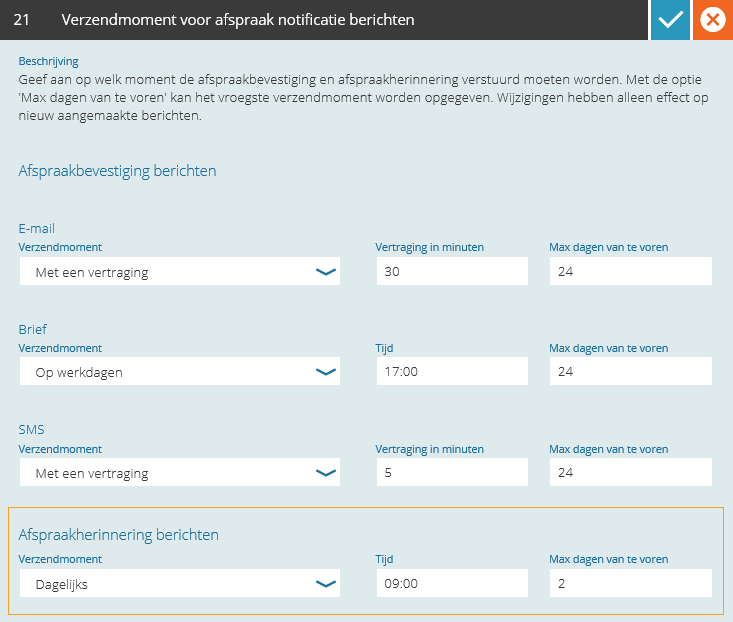
Setting 21 also defines for reminder messages the sending moment. The options are:
- Daily at a specific time of day
- On workdays at a specific time of day
- Every hour
- Never create messages
For reminder messages also needs to be defined what the earliest sending moment can be (defined as a maximum number of days before the start of the appointment).
Examples
- A reminder message (either letter, text message or email) is generated on the 1st of February of 2017 at 16:30
- The appointment is planned on the 28th of February at 10:00
- The sending moment for reminder messages is set to ‘daily at 9:00, maximally 1 day before the appointment’
Sending will be possible from: Monday, 27th of February, at 9:00
- A reminder message (either letter, text message or email) is generated on the 1st of February of 2017 at 16:30
- The appointment is planned on the 28th of February at 15:00
- The sending moment for reminder messages is set to ‘every hour, 48 hours before the appointment’
Sending will be possible from: Sunday, 26th of February at 15:00